Skip to content
Jompom
ServicesAboutPricingBlogContact
Client portalGet started
ServicesAboutHow it worksPricingBlogContactClient portal
Get started in 4 short steps

Build your plan

Choose your WordPress maintenance plan in a few steps: pick your support hours, choose monthly or yearly billing and tell us about your site. You connect your site in 2 minutes, we check it and email a secure Payoneer payment link, and your plan is set up within 12–24 hours of payment.

  • No card details on this form
  • Replies within 2–6 hours
  • Every plan, every feature

Your order

It takes about two minutes. Nothing is charged here.

Step 1Pick your one-off job

A fixed price, paid once. No subscription and no minimum term.

Step 2Tell us about your site and where to send your welcome email

We send the payment link here.

More than one site? Tell us here and we'll quote. Please don't send passwords or logins here. We send you a secure way to share them.

One plan covers one website. Looking after more than one site? Mention it in the notes and we’ll get back to you with a quote.

Please don’t send passwords or logins here. You never need to: our small plugin connects your site without them.

Order received!

We’ve sent the 2-minute steps to connect your site to your inbox. Once it’s connected, we check it and send your invoice within one working day.

  1. 1

    Connect your site

    Your welcome email has our small Jompom Care plugin and a one-click link to connect your site. About 2 minutes, no passwords.

  2. 2

    We check your site

    We scan your site and email a secure Payoneer invoice for your Security clean-up (one-off) within one working day. Pay by card or bank transfer.

  3. 3

    We do the work

    We start as soon as it is paid, back up your site first and send you a report when it is done.

Back to homeRead the FAQ

Your order

Security clean-up
Malware removal, hardening and a report
Popular
$012345678901234567890123456789one-off$199 one-off
Billing
One-off
Minimum term
None
Payment request
$199 once
Website
Not added yet
Platform
WordPress

This job includes
  • Full backup before we start
  • Malware and backdoor removal
  • Database clean-up
  • Closing the way in + hardening
  • Help with Google’s review
  • Report of everything we fixed

No card details are collected here. You pay through a secure Payoneer payment request we email you.

  • 2–6 hoursUsual response time
  • 12–24 hoursPlan set-up after payment
  • 12+ yearsLooking after WordPress sites
  • 60+Developers & web experts
On this page
  • 01Your order
  • 02What every plan includes
  • 03Ordering questions
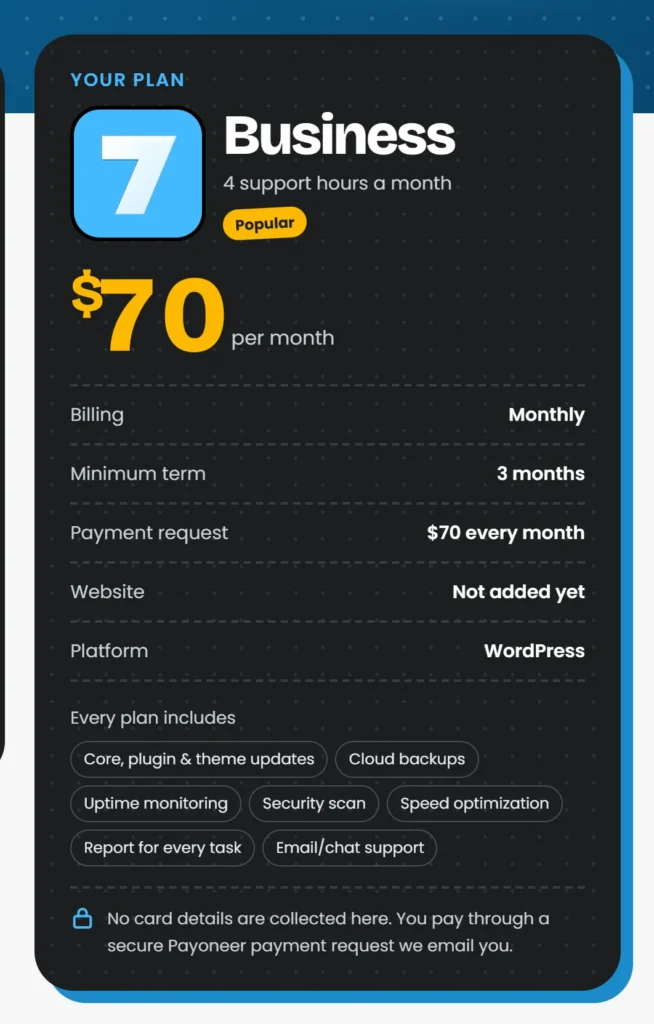
WordPress maintenance plan summary: Business plan, billing, minimum term and what every plan includes
Example: the summary card for a Business plan with monthly billing

Your plan at a glance

What every WordPress maintenance plan includes

The illustration is an example of the summary card next to the order form. It shows the Business plan with monthly billing: 4 support hours a month for $70, the minimum term, the payment request you’ll receive and the platform. The card updates as soon as you pick a plan and billing.

Whichever plan you choose, your WordPress maintenance plan covers the same work: core, plugin and theme updates, cloud backups, uptime monitoring, a security scan, speed optimization, a report for every task and email/chat support. The plans differ only in support hours: 2, 4 or 6 a month.

Updates and backups go together for a reason: WordPress.org advises backing up your site before you update, so a clash with a plugin can be rolled back instead of taking your site down.

Further reading

  • Updating WordPress (WordPress.org) (opens in a new tab)
  • WordPress backups (WordPress.org) (opens in a new tab)

At a glance

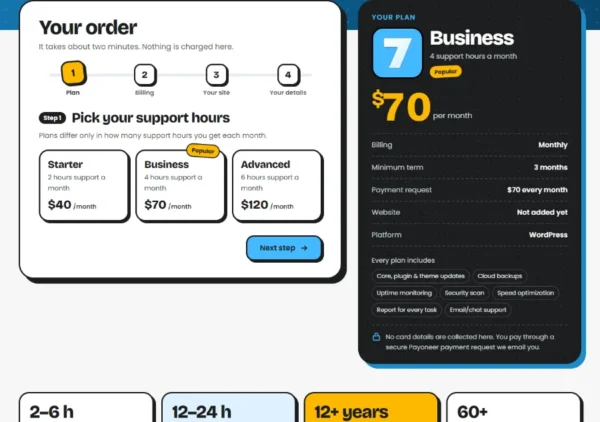
  • Preview of "Your order" on the Jompom order page
    Your order
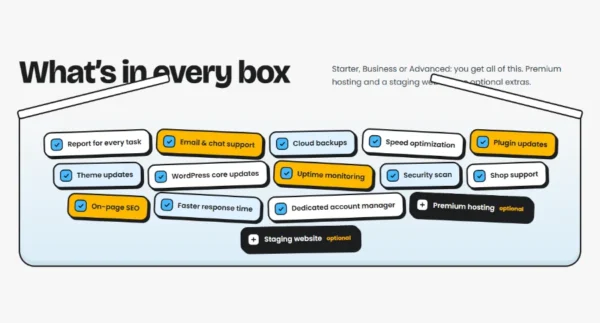
  • Preview of "What’s in every box" on the Jompom pricing page
    What’s in every box
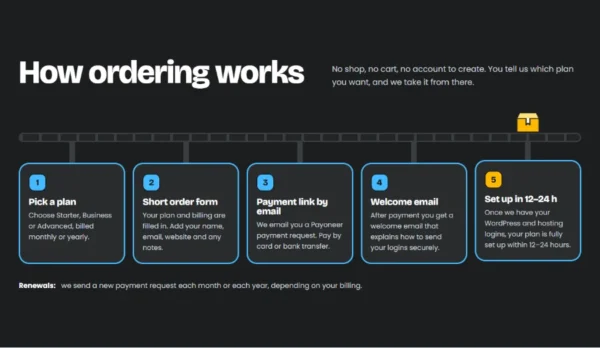
  • Preview of "How ordering works" on the Jompom pricing page
    How ordering works

Ordering questions

Something else about your WordPress maintenance plan? Ask us before you order.

Ask a question

After you send the form, you get a welcome email with the 2-minute steps to connect your site. Once it’s connected, we check it and email a secure Payoneer payment request within one working day. You can pay by card or bank transfer. No card details are collected on this page.

No passwords needed: our small Jompom Care plugin connects your site, and you can give us safe temporary access with one click. Your plan is fully set up within 12–24 hours of payment.

Yes, you can switch at renewal. Yearly billing costs less per month, while monthly billing keeps you flexible. Step 2 of the form shows the minimum term for each option.

One plan covers one website. Looking after more than one site? Mention it in the notes and we’ll get back to you with a quote.

Jompom

We safely update WordPress core, plugins and themes, and keep your site online, secure and fast.

Services

  • Security
  • Malware removal
  • White label for agencies
  • Maintenance
  • WooCommerce care
  • Speed Optimization

Useful links

  • FAQs
  • Pricing
  • Blog
  • Sample report
  • Terms
  • Privacy
  • Cookie policy
  • Accessibility

Support

  • Post a ticket
  • Get started
  • Jompom Care plugin
  • Client portal
  • Contact us
JOMPOM
© 2026 Jompom.com. All rights reserved.WordPress care, 24/7.